Devlog · Phase 0 · 4/7
Email Confirmation for aubia.dev's Waitlist
aubia.dev records a signup request before email confirmation. How the form catches typos, limits abuse and handles addresses that remain unconfirmed.
by Mike, founder of Aubia Published on Updated on 7 min read
- waitlist
- react
- security
- gdpr


You can type someone else's email address into a form. Successfully validating that address doesn't tell you who submitted it, or whether the recipient wants an invitation.
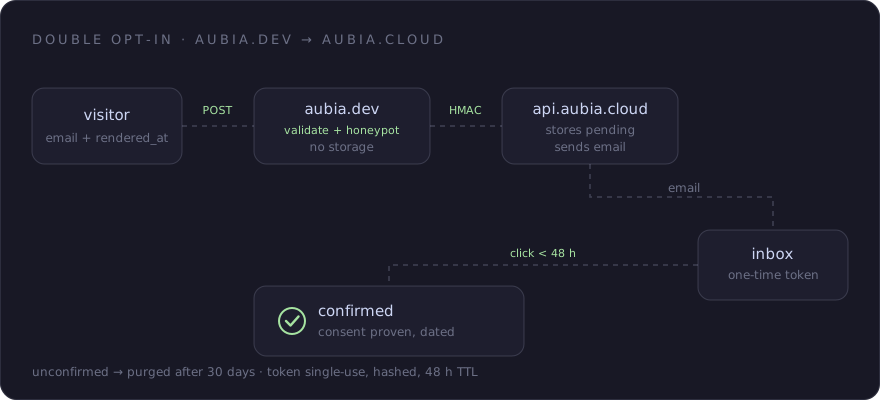
On aubia.dev, I therefore ask for confirmation by email. The form creates a pending signup on aubia.cloud, then a link sent by email lets the recipient confirm it. This double opt-in adds a step to the process, and the message may never be opened.
The website forwards the request without keeping signup records in a local database. The article on running without a database explains this separation between the website and the cloud.
Catching a Typo Before Submission
A mistyped address can be valid and still never receive the intended message. The form suggests a correction when the domain resembles a known email service: gmial.com might become gmail.com.
The comparison uses Levenshtein distance, which counts the edits needed to turn one string into another. It checks the domain, then its suffix if no domain correction was found, against limited lists. It doesn't query the mailbox or correct the part before the @.
The suggestion appears when you leave the field. It is also recalculated on submission, because submitting from the keyboard doesn't necessarily move focus out of the field. If a likely typo is detected, the first submission is held back so you can check the address.
You can apply the correction or keep what you typed. Both buttons return focus to the field without submitting the form. You can submit the same address a second time even without choosing either option: resemblance to a known domain isn't enough to block an address you know is correct.
The label is associated with the field, errors use aria-invalid and role="alert", and aria-describedby connects the suggestion to the input. The correction needs to be readable without relying on a change of color.
Immediate Feedback, Pending a Response
The React component submits the form through Inertia without reloading the whole page. As soon as submission starts, a status message appears below the field, in a role="status" region, before the server responds.
This display anticipates success. Before the server responds, the browser doesn't yet know whether the cloud has recorded the request or whether an email can be delivered. The actual response replaces it with the appropriate message, or rolls back the provisional state if an error occurs.
The cloud distinguishes four outcomes for an accepted request:
| Outcome | How the request is handled |
|---|---|
confirmation_sent |
A pending signup is created and the confirmation email is queued. |
confirmation_resent |
A new link is prepared for a pending signup once the resend waiting period has elapsed. |
already_pending |
A recent request already exists; no new email is triggered. |
already_confirmed |
The address is already confirmed; there is no signup to start over. |
Each outcome has a message translated into the site's six languages. I would rather tell someone their address is already confirmed than leave them waiting for an email that won't be sent.
The proxy also checks the HTTP status code. Validation, rate-limit and service errors take precedence over any success status in the response body. HTTP 409 paired specifically with already_confirmed is recognized as an already confirmed signup. Other conflicts are not treated as successes.
A rejected address and an exceeded request limit each have their own message. A rejected signature or an unavailable cloud service produces a temporary unavailability message; the technical details are used for server-side diagnosis.
The confirmation_sent result signals that the server has requested the message be sent. A queued job carries out the request: sending can still fail, and the recipient's mail service can filter the message.
Limiting Abuse Without a Captcha
I don't add a captcha to the form. It would require another check from the visitor without making automated submissions impossible. The site combines checks that require no additional interaction.
A honeypot, a field hidden from view and excluded from keyboard navigation, must remain empty. It catches submissions from bots that fill in fields indiscriminately. A time trap compares a timestamp supplied by the browser with the submission time and rejects submissions that arrive too quickly.
The server checks these values, but they come from the client. A program can leave the honeypot empty and provide an acceptable timestamp. These traps filter simple behavior; a form that gets past them may have been filled in by a human or by a program.
A rate limiter works in parallel per IP address, per email address and across the total request volume. The email limit reduces repeated requests targeting one recipient. The global cap bounds requests even when they come from multiple IPs, at the cost of potentially rejecting legitimate signups during a traffic surge.
Address validation checks the format and, in production, the domain's DNS. DNS can help rule out a domain unsuitable for receiving mail, but it doesn't establish whether the specific mailbox exists.
Once the website accepts a request, it signs it with HMAC before forwarding it to the cloud. The two servers share a secret used to verify the signature of the received body. This protects the server-to-server signup request: it prevents an unsigned call to that endpoint from replacing the proxy. Not every API route requires this signature, particularly those using confirmation or unsubscribe tokens.
The Link in the Email
The cloud records the address with a PENDING status before preparing the email. The link contains a random token, with only its hash stored in the signup record. It is valid for 48 hours from the send timestamp recorded by the application, before the mail job runs.
The confirmation button opens an aubia.dev page in the language used for signup. After loading, the page reads the token from the URL and queries the cloud API directly. It displays the result: confirmed, already confirmed, invalid link, not found or expired.
Confirmation updates the status and its timestamp only once. Two concurrent requests must not trigger two confirmations. Another click on the same recognized link returns "already confirmed", even after the original validity period, since the signup has already been completed.
For an address still pending, a resend replaces the token hash and starts a new validity period. The previous link can therefore no longer find the signup. The resend invalidates the previous link as soon as it is prepared, even if the new email hasn't arrived yet.
The confirmation and unsubscribe pages declare noindex. This directive asks search engines not to index them; it doesn't restrict access. Language-switcher links are rebuilt without the query string to avoid copying the token into five other URLs. Switching languages therefore doesn't continue confirmation with that token.
A program capable of following the link and executing this process can also confirm. Double opt-in checks the use of a link sent to the supplied address, whether a person or a program uses it. The confirmation timestamp helps track the signup and covers only part of the processing's GDPR compliance.
Addresses That Remain Unconfirmed
Token expiry doesn't delete the record. A daily task deletes signups still marked PENDING whose original signup date is more than 30 days old. Resending a confirmation doesn't reset this retention period.
Unsubscribing follows a different process. The dedicated page sends the token to the cloud, which anonymizes the record: the email address is replaced, tokens and attribution data are cleared, and the status becomes PURGED. The row itself remains, along with its timestamps.
The confirmation button in the email body is separate from the List-Unsubscribe and List-Unsubscribe-Post headers. These headers give email clients instructions for offering an unsubscribe option. Each client then chooses whether to display the command, and handles it in its own way.
The Counter, Limited to Confirmed Signups
The homepage counter asks the cloud for the number of signups with a CONFIRMED status. Pending addresses are excluded. Administrative invitations recorded directly as confirmed are also counted, so the total doesn't correspond exclusively to clicks on links from the public signup form.
The value arrives after the initial render through a deferred request, with a server-side cache. It can lag behind a confirmation and is only displayed above a threshold. The article on the aubia.dev stack explains how it is loaded.
To measure how many form submissions reach confirmation, I need to distinguish them from administrative invitations.
Aubia's beta is free, with no time limit. Sign up to receive your invitation.
Join the waitlist